
Managed IT for medical and dental practices · Lee County, FL
Getting started
BAA and documentation in week one, monitored and protected by week three, a restore tested by week four.
One flat monthly price, published up front.
- Day 1A BAA signed first
Signed before any work touches patient data. Then the kickoff call: scope, contacts, and every user asked what has been bugging them.
- Day 3The Quick Wins note
One page: what we fixed already, what is scheduled with a date, and what we are not doing and why.
- Week 1Everything documented
Machines, accounts, network, and vendors written down in one place instead of in someone's head.
- Weeks 2 to 3Under management
Monitoring, patching, endpoint protection, and Microsoft 365 or Google Workspace backup on every machine, with MFA enforced. Former staff and the previous provider's access removed.
- Week 4A restore actually tested
A real restore run and dated, so your backup answer has a date on it rather than a dashboard showing green.
- Day 30The 30-day check-in
A short call to confirm things are running and surface friction while it is still small. From here on: a monthly plain-language report and a quarterly review.
01 · Sound familiar
A normal week with nobody on IT
The front desk cannot print. Every appointment after the first runs late.
The chart system spins. You are in the room and cannot see a history.
Imaging sensor not recognized. Your manager is on hold, an operatory sits empty, and you know what that hour costs.
Someone clicked something. Nobody can say whether patient data went with it.
Someone who left in the spring still has a working login to the charts.
Cyber insurance wants a documented risk analysis. You do not have one.
The machines underneath have no support number.
Your imaging vendor supports the sensor. Your practice management vendor supports the software. The machines, network, and accounts all of it depends on have no support number, so the job lands on your office manager. That is the part we take.
02 · Start here, free
How it starts
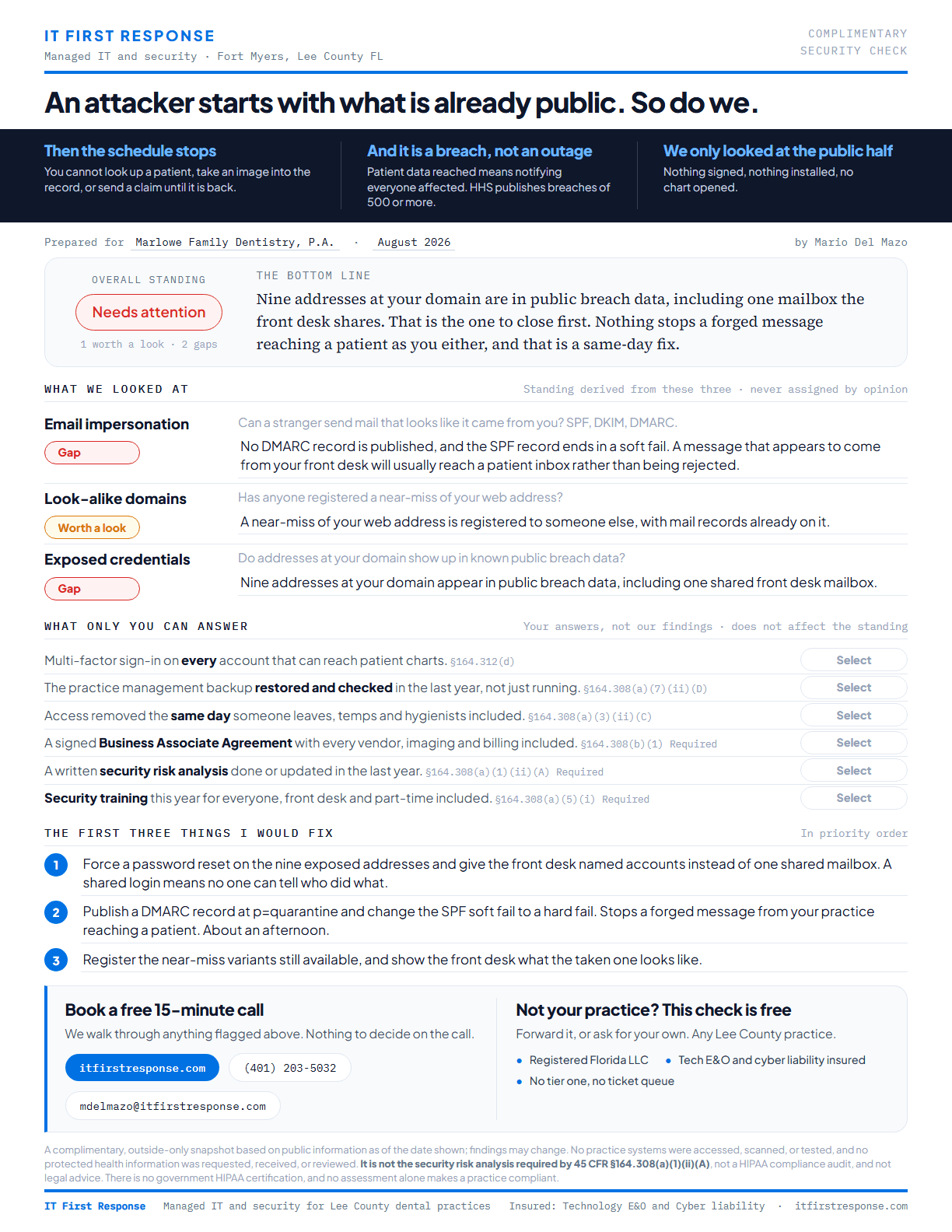
Read the full sample
The free Security Check
One page: can a stranger send mail that looks like it came from you, has anyone registered a near-miss of your web address, and do your addresses show up in public breach data. Observed from the outside. Nothing touches your network.
Fifteen minutes, if you want
We talk through the findings. Nothing is sold on that call.
The first thirty days
BAA and documentation in week one, monitored and protected by week three, a restore tested by week four.
What we do not do
Replace your practice software
Your EHR and imaging stay as they are. We keep what they run on healthy.
Sell you HIPAA compliance
Nobody can. Walk away from anyone who offers. We do safeguards and records.
Push hardware at you
Not a reseller. We carry E&O and cyber liability, so our mistakes are our risk.
03 · Published, not quoted
Three plans, one flat bill
If your office holds patient records, Managed IT + HIPAA is your plan. The business associate agreement is part of it, signed before any work touches patient data, and so is the annual risk analysis. The other two exist for offices that do not handle protected health information.
Monthly plans
$60, $125, or $185per user, per month
Essentials and Managed IT carry the same protection and differ only on whether support hours are included. Managed IT + HIPAA adds what a practice has to be able to show.
A user is a person, not a device and not a login. Anyone who works on your systems counts, whether or not they have their own login or their own mailbox. Accounts that belong to equipment rather than a person, like a scanner, do not.
Essentials
$300 / month
Support billed at $125/hr as you use it. Onboarding $750, waived on an annual term.
Managed IT
$625 / month
Includes 5 hours of support a month, pooled. Onboarding $750, waived on an annual term.
Managed IT + HIPAA
$925 / month
The same 5 hours, plus the compliance layer. For practices and agencies that handle patient records. Onboarding $750.
Where they cross
2.6 hrs / month
Use less than that and Essentials costs you less. Use more and Managed IT does.
Covered by Essentials
- Automated monitoring and alerting
- Automatic patching and updates
- Managed antivirus and ransomware protection
- Microsoft 365 or Google Workspace backup
- Account and device management, including onboarding and offboarding of users
- Email authentication (SPF, DKIM, and DMARC)
Covered by Managed IT
- Automated monitoring and alerting
- Automatic patching and updates
- Managed antivirus and ransomware protection
- Microsoft 365 or Google Workspace backup
- Account and device management, including onboarding and offboarding of users
- Email authentication (SPF, DKIM, and DMARC)
- One hour of remote support per user each month, pooled across your teamNot on Essentials
Covered by Managed IT + HIPAA
For practices and agencies that handle patient records. Everything in Managed IT at $125, plus $60 per user for the compliance layer, with the same pooled hour.
- A signed business associate agreement, before any work touches patient data
- Around-the-clock monitoring by a 24/7 security operations center. Anything found overnight is contained at the time, then picked up with you during business hours.
- An annual security risk analysis, the document investigators ask for first
- Your safeguards written down, with the evidence that they are in place
- Security awareness training and phishing simulation for your staff
- Audit logging that is reviewed, not only collected
- Encrypted backup with a restore that has been tested and dated
- A written incident response plan. If you ever have to notify, that duty stays yours, and the plan is what makes it survivable.
Safeguards and records, not a certificate. No IT vendor is HIPAA certified, because no such certification exists, and IT First Response does not claim to be one. What the rule obligates your practice to do stays a question for healthcare counsel.
For caregivers
User Lite$75 / user / mo
A caregiver who works from a phone and has no company computer does not need the full $185 seat. User Lite covers them at $75.
- Accounts opened when a caregiver joins and closed when they leave, at no charge, however often your roster turns over
- Sign-in security and multi-factor authentication on every account
- Your data protected inside the apps we manage, and removed from a personal phone when someone leaves
- Email security, security awareness training, and simulated phishing
- Identity monitoring on every account
No support hours are included. Password resets and multi-factor re-enrolment are free, and other help for a User Lite is billed at $125 per hour. A personal phone does not get the same protection as a company computer.
Billed at $125 per hour
- Support time: all of it on Essentials, or time beyond your pool on Managed IT
- On-site visits
- After-hours and weekend work
- Major projects and migrations, such as a server move or an office relocation
- Cabling and hardware
- Support for software outside your managed stack
We will always tell you before work moves into billable territory.
Questions practices ask
Will you sign a BAA?
Yes, before any work touches patient data. It is written into the Managed IT + HIPAA plan rather than negotiated after you sign, which is why that is the plan a practice goes on.
Why does the practice plan cost more?
$185 per user is Managed IT at $125 plus $60 for the compliance layer, and seven of the eight things that $60 buys are records and process rather than software: the business associate agreement, an annual security risk analysis, your safeguards written down with the evidence behind them, staff training and phishing simulation, audit logging that gets reviewed, encrypted backup with a restore that has been tested and dated, and a written incident response plan. The eighth is a 24/7 security operations center watching your machines, so anything found overnight is contained at the time and picked up with you during business hours. Most of that list is what the Security Rule already asks your practice to hold, which is the point: it is paperwork you are supposed to have, not more software.
Can you make us HIPAA compliant?
Nobody can sell you compliance, and you should be suspicious of anyone who says otherwise. We put the safeguards the Security Rule asks about in place and keep the records that show they work.
Do you support Dentrix, Eaglesoft, Open Dental, or our EHR?
We keep the machines, network, and accounts your clinical software runs on healthy, and we take the vendor calls when it will not load. We do not replace what you already use.
What if something breaks during patient hours?
Your staff calls directly. There is no ticket queue and no account manager. The target is to respond within 15 minutes and be working on it within the hour, whatever the priority, Monday to Friday 8 to 5 Eastern. Those are response and start targets, not resolution guarantees. Outside those hours you can still call the business line, and that work is billed hourly.
We already have someone for part of this.
That works. One provider stays accountable for the whole picture, so nothing falls between us.
Do you require a long contract?
No seat minimum and no multi-year lock-in. The annual term is optional and waives the onboarding fee.
Start with the free Security Check
One page, three findings. No meeting, nothing to install.