
Managed IT for law offices · Fort Myers
Getting started
Documentation in week one, monitored and protected by week three, a restore tested by week four.
One flat monthly price, published up front.
- Day 1Kickoff
A call to confirm scope, contacts, and how support works. Then we ask every user what has been bugging them and log each answer as a ticket.
- Day 3The Quick Wins note
One page: what we fixed already, what is scheduled with a date, and what we are not doing and why.
- Week 1Everything documented
Machines, accounts, network, and vendors written down in one place, so the knowledge is not living in one person's head.
- Weeks 2 to 3Under management
Monitoring, patching, endpoint protection, and Microsoft 365 backup in place on every machine, with MFA enforced. Former staff and the previous provider's access removed.
- Week 4A restore actually tested
A real restore run and dated, so the backup line on your renewal is a documented yes.
- Day 30The 30-day check-in
A short call to confirm things are running and surface friction while it is still small. From here on: a monthly plain-language report and a quarterly review.
01 · Start here, free
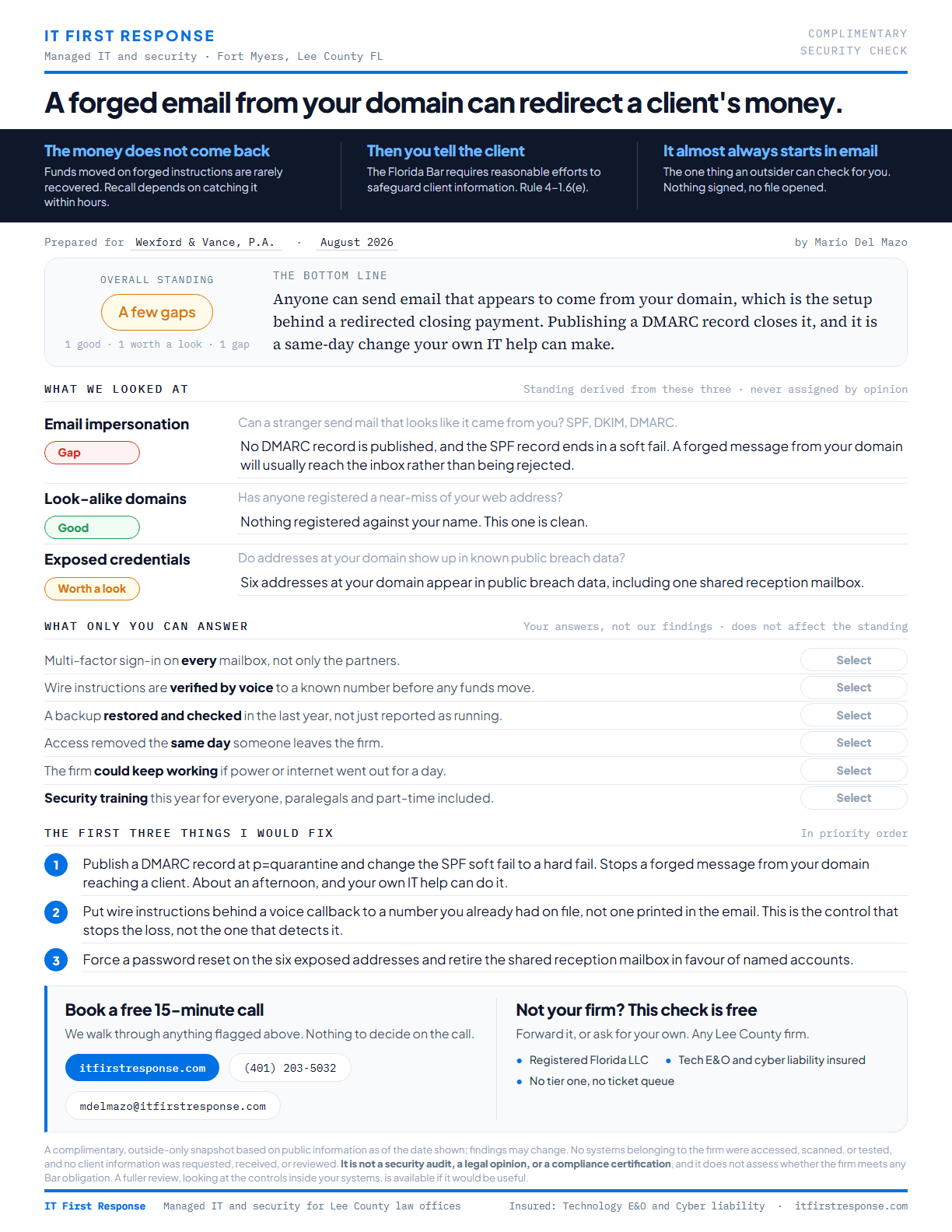
The Security Check
Read the full sample
A one-page review of what is publicly visible about your firm, with three specific findings and the first three things we would fix. No meeting, no signup, nothing to install.
- Observed from the outsideNothing touches your network.
- Three findings in plain EnglishAn overall standing, and what we would fix first.
- Yours to keepFive minutes to read, and it is yours either way.
If the findings raise questions, we talk for fifteen minutes. Nothing is sold on that call.
02
No layers between you and the fix
Most providers put an account manager between you and the work, then route your call into a first-tier queue where whoever picks up has never seen your systems.
We built this the other way around. Whoever answers already knows your setup, because it is documented rather than kept in someone's head, so nothing gets explained twice.
Client files treated as privileged
Our background is IT for a healthcare organization operating under HIPAA and HITRUST standards, where access control, encryption, and documented process are daily requirements. Those same habits carry into your firm: least-privilege access, encrypted and tested backups, and changes that are documented rather than improvised.
Covered if something goes wrong
IT First Response carries technology errors and omissions and cyber liability insurance, so a mistake or a security incident is our risk to carry, not yours. Ask any time and we will send a certificate of insurance.
03 · The renewal questionnaire
Answer your cyber insurance renewal honestly.
Renewals now ask direct questions: is multi-factor authentication enforced, are backups tested, are machines monitored and patched. Firms guess, and an answer you cannot back up puts the coverage itself at risk.
We set your firm up so the honest answer is yes, and we keep the records that show it.
04
Your case management software keeps working
We do not replace Clio, PracticePanther, or the document system your firm has trusted for years. We keep the machines, network, and Microsoft 365 accounts they depend on healthy, so your software is never down because of something underneath it.
And when a vendor does need to get involved, we make that call and sit through that hold music, not your paralegal.
05 · Published, not quoted
Simple monthly pricing
Monthly plans
$60 or $125per user, per month
The same protection either way. The only difference is whether support hours are included or billed as you use them.
A user is a person, not a device and not a login. Anyone who works on your systems counts, whether or not they have their own login or their own mailbox. Accounts that belong to equipment rather than a person, like a scanner, do not.
Essentials
$300 / month
Support billed at $125/hr as you use it. Onboarding $750, waived on an annual term.
Managed IT
$625 / month
Includes 5 hours of support a month, pooled. Onboarding $750, waived on an annual term.
Where they cross
2.6 hrs / month
Use less than that and Essentials costs you less. Use more and Managed IT does.
Covered by your plan
- Automated monitoring and alerting
- Automatic patching and updates
- Managed antivirus and ransomware protection
- Microsoft 365 or Google Workspace backup
- Account and device management, including onboarding and offboarding of users
- Email authentication (SPF, DKIM, and DMARC)
- One hour of remote support per user each month, pooled across your teamNot on Essentials
Billed at $125 per hour
- Support time: all of it on Essentials, or time beyond your pool on Managed IT
- On-site visits
- After-hours and weekend work
- Major projects and migrations, such as a server move or an office relocation
- Cabling and hardware
- Support for software outside your managed stack
We will always tell you before work moves into billable territory.
Want the full walkthrough of the numbers, including when hourly makes more sense than a plan? Read what IT support costs a small law firm in Florida.
Questions firms actually ask
Do you work with our practice management software?
Yes. We do not replace Clio, PracticePanther, or your document system. We keep the machines, network, and Microsoft 365 accounts they depend on healthy, and when the software vendor needs to get involved, we make that call for you.
Can you help with our cyber insurance renewal?
Yes. We set your firm up so the answers on the renewal questionnaire, multi-factor authentication, tested backups, patching, are honestly yes, and we keep the records that show it.
We already have someone who handles part of this. Does that work?
Yes. We work alongside existing vendors and your practice management support. The difference is that one provider stays accountable for the whole picture, so problems cannot fall between providers.
Do you require a long contract?
No. There is no seat minimum and no multi-year lock-in. The annual term is optional, and choosing it waives the onboarding fee.
Start with the free Security Check
One page, three findings, five minutes to read. No meeting and nothing to install.